
This is a guest contribution from Brian Wilson (BGP Brian), creator of the BGP Black Belt community and educator focused on BGP operations.
Border Gateway Protocol (BGP) is the routing protocol of the Internet. It determines how traffic moves between autonomous systems and ultimately decides where packets go.
But while BGP makes routing decisions, it doesn’t provide an easy way to observe those decisions at scale.
To solve this visibility problem, a protocol called the BGP Monitoring Protocol (BMP) was developed.
In this post, we’ll examine what BMP is and how it can be used for troubleshooting, visibility, and control-plane monitoring in modern networks.
What is BMP?
The BGP Monitoring Protocol (BMP) is a standardized protocol (RFC 7854) that allows routers to export detailed BGP control-plane information to an external monitoring system.
Unlike BGP itself, BMP does not influence routing decisions. It is strictly observational.
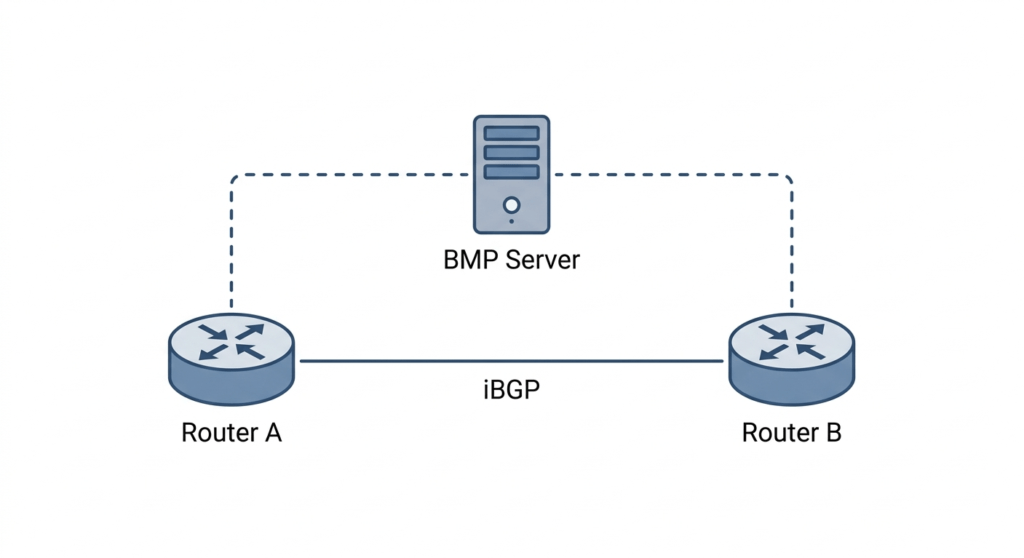
BMP streams routing updates and other BGP statistics from a router to a centralized collector in real time, giving engineers full visibility into what the router is seeing and doing.
The Visibility Challenge with BGP
Traditionally, engineers troubleshoot BGP using CLI commands such as:
show ip bgp

show ip bgp neighbors [ip address]
This works well on individual routers.
But in large enterprise or service provider networks, you might have hundreds of BGP peers, millions of prefixes, and complex route policies.
If a prefix is missing or behaving unexpectedly, we might typically ask the following questions:
- Did the peer send it?
- Did inbound policy filter it?
- Was it rejected due to AS path?
- Was it withdrawn?
Answering these questions by logging into each router individually does not scale. In large networks, it is far more efficient to maintain a centralized repository of BGP control-plane data.
BMP enables this by continuously exporting BGP information from each router to a central data collector.
How BMP Works
BMP establishes a separate TCP session from a router to a monitoring station, known as a BMP collector.
The collector’s IP address and port are configured under the BGP process on the router, and then activated per neighbor. For example:
router bgp 65000

bmp server 1 address 10.10.10.100 port 5000

neighbor 192.0.2.1 remote-as 65001
neighbor 192.0.2.1 bmp-activate server 1
The BMP collector does not send any messages to the router but simply listens for incoming messages.
Once the session is established, the router sends:
- Initiation / Termination messages
- Peer Up / Peer Down messages
- Route Monitoring messages (initial BGP table dump + incremental route updates)
- Statistics Reports (number of prefixes sent and received, etc)
- Route Mirroring messages (allows exact duplication of a BGP session)
One of BMP’s most powerful capabilities is its ability to export both:
Pre-Policy Routes
Routes exactly as received from a peer, before any route maps or filters are applied.
Post-Policy Routes
Routes after inbound policies have been applied, showing what was actually accepted into the BGP table.
This distinction is critical.
If a route disappears, BMP allows you to determine whether:
- The peer never sent it
- Your policy filtered it
- It failed validation
- It was withdrawn
Key Advantages of BMP
BMP provides several major advantages.
1. Scalable Troubleshooting
In networks with route reflectors and layered policies, control-plane visibility is essential. BMP provides centralized insight across all routers and peers.
Instead of logging into devices individually, you analyze a unified stream of BGP activity.
2. Security Monitoring
BMP enables detection of:
- Route leaks
- Prefix hijacks
- Unexpected mass withdrawals
- Abnormal update churn
Security teams can monitor routing behavior in near real time and correlate anomalies across the network.
3. Historical Analysis
Unlike CLI commands, BMP feeds collectors that store data over time.
This enables:
- Trend analysis
- Churn measurement
- Peer stability tracking
- Capacity planning
When something breaks, you can rewind and see exactly when and why it happened.
BMP in Route Reflector Environments
BMP is particularly valuable in route reflector architectures.
Route reflectors simplify iBGP scaling, but they can obscure routing differences between clients. If one client is missing a route, troubleshooting can become difficult.
With BMP enabled on route reflectors (or clients), you can see:
- What each peer advertised
- What policies accepted or rejected
- What was reflected
- What was installed
For large-scale networks, this level of visibility is transformative.
Deployment Considerations
Before enabling BMP, keep a few factors in mind:
- CPU impact – exporting full routing tables can be resource-intensive
- Bandwidth usage – initial table dumps are large
- Storage requirements – historical BGP data grows quickly
- Collector security – control-plane data should be protected
A best practice is to:
- Start with route reflectors
- Monitor system performance
- Scale collectors appropriately
Because BMP is observational and does not alter routing decisions, it can generally be deployed with low operational risk.
Final Thoughts
BMP offers advanced telemetry and diagnostic capabilities for BGP.
In modern networks where many systems are centrally managed and software-driven, network-wide visibility into the BGP control plane is a significant operational advantage.
BMP delivers continuous, real-time insight into BGP behavior, including which prefixes were received, filtered, and installed.
It allows a full audit of BGP anomalies from a centralized location.
And in large networks, that audit log can help resolve BGP issues in a fraction of the time it would take to manually troubleshoot via CLI.
About the Author
BGP Brian (Brian Wilson) runs a BGP training community on Discord called BGP Black Belt. He also regularly posts about BGP topics on LinkedIn. You can find him at www.linkedin.com/in/brianwilson-bgp.