
FastNetMon Advanced offers complete production-ready integration with cloud DDoS scrubbing service provided by F5 XC and F5 Silverline (legacy).
You can find the official press release of this capability on the F5 website here.
How does FastNetMon scrubbing centre diversion integration work?
When FastNetMon detects an attack against an IP address, it determines /24 prefix for the IP which is under attack and then announces it to the scrubbing centre. When the attack stops or the ban time expires, FastNetMon removes the announce from the scrubbing centre using their API.
Please check that your version of FastNetMon is 2.0.357 or newer.
To use FastNetMon with F5 Distributed Cloud XC, you will need to request a certificate from F5 management portal the followng way:
- Log in to the Distributed Cloud Tenant
- Click Administration
- Under IAM -> Service Credentials -> Add Service Credential
Then fill the following information:
- Add credential email
- Select "Credential Type" to "API Certificate"
- Add password
- Push expiry date as far as the calendar allows
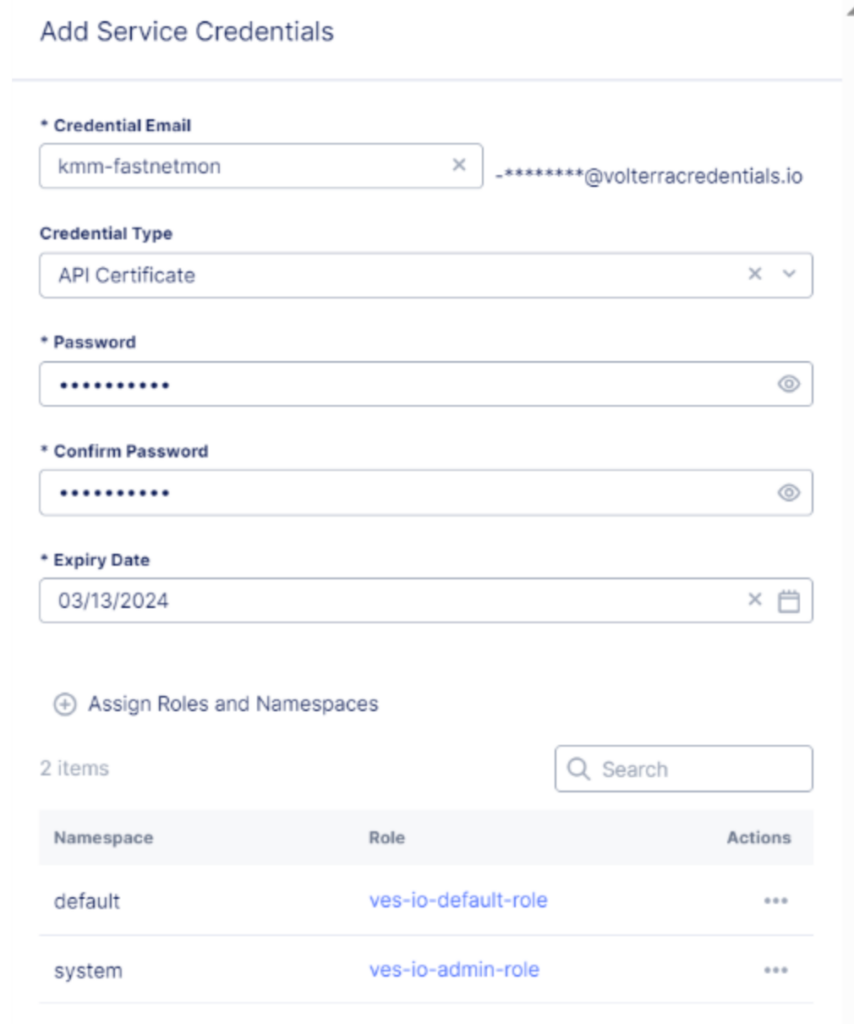
Then click on "Assign Roles and Namespace" and provide the following information:
- Namespace: "system"
- Set flag "Make Admin"
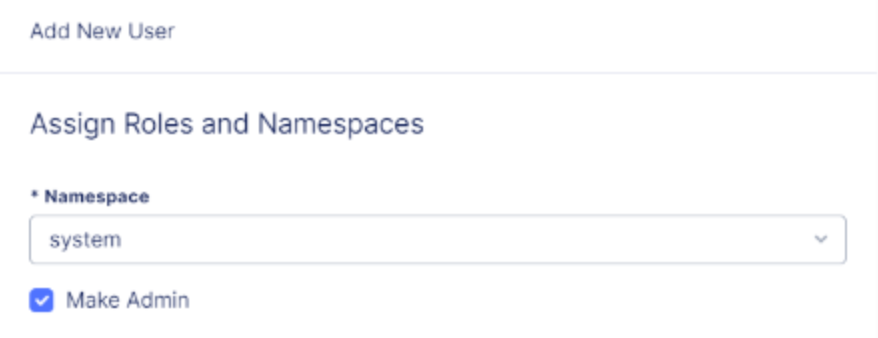
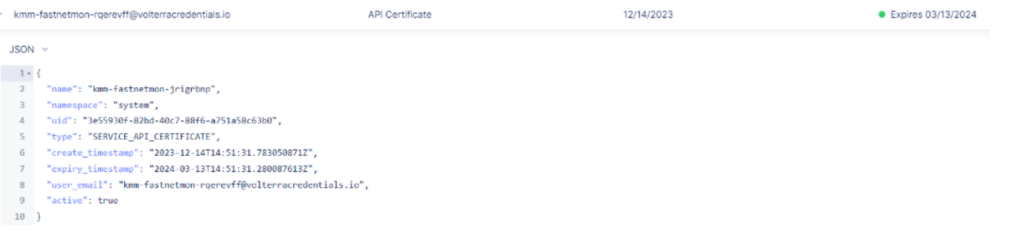
After that, click "Assign Roles" and "Download". Once downloaded, it will generate a “.p12” certificate. Check to see if the certificate is valid in the WebUI:
Then please use fcli to apply the configuration:
sudo fcli set plugin scrubbing_services_integration provider_name f5_xc
sudo fcli set plugin scrubbing_services_integration f5_tenant_url customer.specific.url.f5.io
sudo fcli set plugin scrubbing_services_integration f5_p12_certificate_path /opt/f5xc/ddos.p12
sudo fcli set plugin scrubbing_services_integration f5_p12_certificate_password servicePassword
sudo fcli set plugin scrubbing_services_integration log_path /var/log/fastnetmon/fastnetmon_scrubbing_services_integration.log
To use FastNetMon with F5 Silverline (legacy), you will need to use email and password:
sudo fcli set plugin scrubbing_services_integration provider_name f5
sudo fcli set plugin scrubbing_services_integration f5_email sales@domain.com
sudo fcli set plugin scrubbing_services_integration f5_password cloud_security
sudo fcli set plugin scrubbing_services_integration log_path /var/log/fastnetmon/fastnetmon_scrubbing_services_integration.log
Finally, configure it on FastNetMon side to call it when FastNetMon blocks/unblocks IP:
sudo fcli set main notify_script_enabled enable
sudo fcli set main notify_script_format json
sudo fcli set main notify_script_path /opt/fastnetmon/libraries/scrubbing_services_integration_plugin/scrubbing_services_integration
sudo fcli commit
After this, we recommend manually blocking some IP addresses from the test prefix and checking that it works as expected.
You can do it in the following way:
sudo fcli set blackhole 1.2.3.4
And then, to unblock, list all the blocked hosts with their UUIDs:
sudo fcli show blackhole
And unblock:
sudo fcli delete blackhole <uuid>
Integration logic has very detailed logging, and you can find it here: /var/log/fastnetmon/fastnetmon_scrubbing_services_integration.log